Floppy Disk Rescue Mission
How I finally managed to save some old software.
The first article is up, and it’s about my involvement with fractals and fractal generators. This blog post is rather about a side quest I had before/while writing it.
A message
The story of how that article came to be starts, weirdly enough, with a message from my sister. She sent me a message just after Christmas letting me know how she was telling her kids about some butterfly-shaped fractals I discovered when I was a kid, but all she can find online are formulae, and whether I could send her some pictures?
Truth is, I did have a webpage about them, except, it was the old page on the old domain I lost. I thought, no biggie, I’ll just checkout my local source of my former website, and realized with horror that I… don’t have them anymore somehow? After some digging, I managed to find them in the Wayback Machine (I was so relieved and thankful that I immediately sent them a donation, too!)
A floppy disk rescue mission
That being my winter break time of the year, it also gave me an impulse to do something I do every third winter break on average related to old software and data – bring out an old Atari ST to the living room floor, power it up, check if some floppies are still readable after many years, maybe create a fresh copy of the more important ones. Like this:
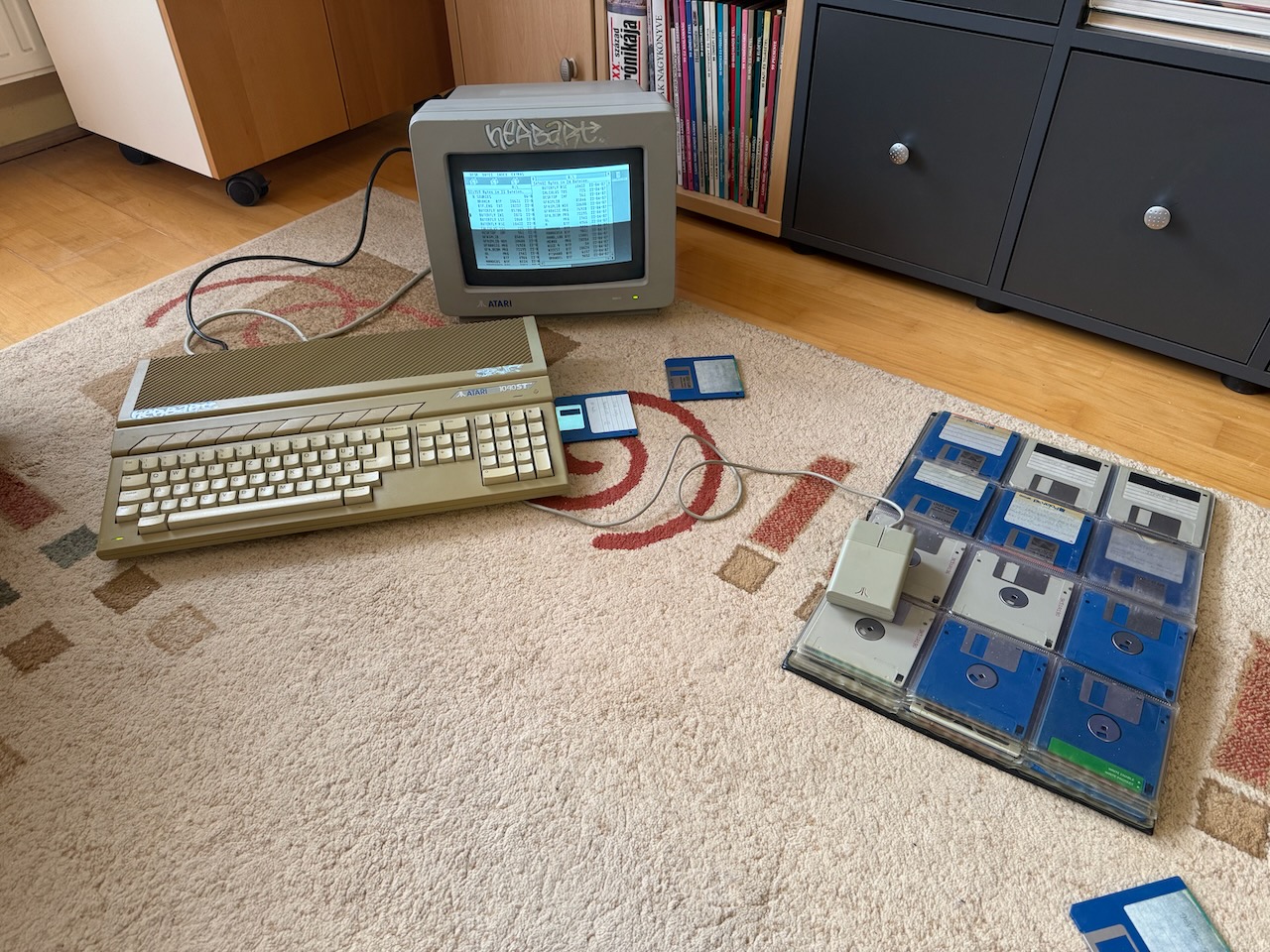
I’d also fire up and play around with some of these programs, marveling at just what I was able to achieve as a seventeen year old kid. I wrote a bunch of software for Atari ST in my youth. Some games, but by far my most favorite piece of software was a fractal generator I named Butterfly Fractal Generator after the visual resemblance of some fractals I discovered. Now you see how did a message from my sister lead me to bring out the old Atari again.
During these times I would also quietly despair at the thought that over the years I never managed to transfer any data off the floppy disks into a more modern ecosystem (e.g. an SSD in a laptop) for preservation. The only media that contains these precious bits of nostalgia are few 3.5" floppy disks. Miraculously, most of them are still readable after three decades, but it’s just a question of time before data gets corrupted and they get lost forever.
So every time I’d try different schemes to rescue them. I have an older PC that still has an internal floppy drive, and I tried various programs in the past that claimed to read and write Atari floppies on PC, but none of them worked. There are solutions to connecting Atari’s serial port to PC’s serial port and transferring data that way, but I was always stumped by the need to find or make a cable for that, or by the fact that I had no way to transfer the necessary software to an Atari floppy so it can run it.
I even considered some crazy schemes myself, like typing in a program on Atari from scratch that’ll convert floppies into modem sounds, recording them, and writing a program on PC that’ll decode them. Fortunately, I didn’t quite follow through on that one.
This year, I found some new rescue tool candidates: a low-level floppy driver named fdrawcmd.sys and an Open-Source program named ST-Recover and an older one named FloImg. Unfortunately, none of them worked either. The floppies kep Being Not Read (or rather, Being Read With Lots of Weird Drive Noise and Accompanying Errors.)
In desperation, I asked for advice on the interwebs, and a kind soul suggested I should try Greaseweazle, which is both software and a little circuit board that directly drives floppy drives. It “directly reads the magnetic flux on the surface of the floppies” – come on, how could I not desperately want to own one of these?
So I ordered a prebuilt Greaseweazle from a shop in Portugal, and it arrived, and I connected everything together, which ended up looking kind of ridiculous. So on one end there’s my MacBook Pro, which connects with a USB-C cable to Greaseweazle, which then connects with a floppy ribbon cable to a floppy disk drive that I took out of the PC chassis. Except… the drive also needs power through a 4-pin Berg connector, and the only power cable I have for it is the one coming out of the PC’s power supply, so I’m operating a noisy old PC beside all of this with an open chassis solely so it can provide power to the floppy disk drive I took out of it in the first place. Oh well, as jury-rigged assemblies go, I’ve had worse. I’m sad I didn’t remember to take a photo.
Anyhow, all of these gadgets are now properly connected to one another, I put in a floppy disk, and… I still got read errors! However, Greaseweazle diagnostics pointed out a curious thing: all read errors were on one side of the disk. I tried a different disk, with same results. Oh dang… it was never any of the software solutions’ fault; rather my old internal floppy disk drive is bust!
Wouldn’t you know it, I found a local business that advertises itself as a “PC scrapyard” and phoned them to confirm whether they have 3.5" floppy disk drives. They did (“we pre-test each one whether it works!”) I went to the place – it was, in fact, very scrapyard like. A store in a basement, with all kinds of PC parts from various eras in heaps on shelves, the proprietor himself not exactly a youngster anymore either. I had a chat with him how his inventory system still runs off of a floppy disk, so having a stash of replacement drives is absolutely essential for his business. Truly a shop frozen in time, that.
I returned home, connected the new drive to the Greaseweazle, and IT WORKED!. Finally, after 33 years, I had a copy of my software that is safe from entropy on floppy disks and I could run on an emulator!
On a sidenote, Greaseweazle needs the exact geometry of the disk on input if you use it in high level read mode (so not imaging the magnetic flux), and back in my youth I carelessly formatted my floppies as anything from 80 to 86 tracks, and from 9 to 11 sectors per track, so it was a bit tedious to figure out the format. I eventually switched back to running ST-Recover and FloImg on the PC, as they read the declared geometry of the disk from its boot sector data. And because of the power supply for the floppy disk, I couldn’t eliminate the PC from the setup anyway.
Next steps
Now that I could extract the data from floppies, I could also use an excellent feature from the Hatari emulator where I can mount a directory on my Mac as a HDD for the emulated Atari, so I can super easily transfer data into the file system on my laptop.
I already created an archival source code repository for my Butterfly Fractal Generator source code on Github. I also spent about a day trying to embed a browser version of the Hatari emulator into the page with the generator preloaded so people can play around with it, but it kept Not Wanting To Work so I gave up on that. In lieu, there’s an Atari ST disk image that you can load into an emulator yourself, should you want to.
I have some other projects from the past that I plan to upload for posterity later, as time allows, but all-in-all it’s a great feeling that they have finally escaped the confines of the old floppy disks.